
Search these docs, or ask Revo a question — answers link the pages they came from.
Porvair Ultravap Mistral
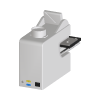 Porvair Sciences Porvair Ultravap Mistral Blowdown evaporator for microplates, with a plate shuttle for automated loading.
The Porvair Sciences Ultravap® Mistral dries down samples by blowing heated gas onto them. A head of needles — one per well, vial or tube — is lowered over the plate and directs nitrogen or clean, dry air onto the liquid surface, and the sample carrier moves under program control so the needles stay just above the solvent as it evaporates. Porvair points out that only the surface is heated; the bulk of the sample stays at ambient temperature.
The Mistral is Porvair’s automation model: a flat front and a plate shuttle that serves and retrieves plates from the deck of most liquid handlers, developed — Porvair states — with Hamilton, Tecan, PerkinElmer, Beckman Coulter and Agilent. Porvair also sells the Mistral XT150, the same design for tubes up to 150 mm, and the standalone Levante. The Revolution driver is written for the Mistral and its remote protocol; it does not name the other two.
Revolution drives the Mistral over its RS-232 remote protocol. A schedule can run one of the 15 methods stored on the instrument, or a method of up to five stages written in the step, and wait for it to finish. It can eject and load the plate shuttle, home or cancel, and read the instrument’s state, gas temperature, platform position and time left in a run.
At a glance
Section titled “At a glance”| Type | Nitrogen (or clean dry air) blowdown evaporator for microplates, vials and tubes |
| Gas temperature | Up to 80 °C, per Porvair |
| Methods | 15 stored, each of 5 gradients, per Porvair |
| Needle heads | 12, 24, 48, 96 and 384, sold separately |
| Plate locations | One, on the shuttle carrier |
| Revolution transport | RS-232, 9600 baud, 8 data bits, no parity, one stop bit, no handshake |
| Revolution control | Run a stored or step-defined method, wait for a run, cancel, eject and load the tray, home, read status |
Specifications
Section titled “Specifications”Porvair Sciences publishes the following on the Ultravap Mistral product page.
| Part number | 500149 |
| Sample holder height | Up to 50 mm |
| Gas temperature | Up to 80 °C |
| Gas flow | Programmable within each method |
| Stored methods | 15 |
| Programmed gradients per method | 5 |
| Carrier movement | 0.1 mm increments |
| Plate shuttle | Yes, with micro-switch obstacle detection on and off the robot deck |
| Remote control | RS232 remote programming and start/stop; CAN bus master/slave |
| Needle heads | 12, 24, 48, 96, 384 (not included) |
| Power | 110/230 V |
The Mistral accepts ANSI/SLAS microplate and tube/vial holder formats, can pause a dry-down, has an eco mode, and restricts method editing to a password-protected administrator level. It has a 4-inch fume duct adaptor with an integrated fan and clear safety screens. Porvair’s product page publishes no dimensions or weight.
On the Mistral, one master unit can drive any number of slave units over CAN bus: a method selected on the master is distributed to the slaves and run on all of them at once. The Revolution driver talks to one instrument over RS-232 and does not manage a CAN bus chain.
Supported methods
Section titled “Supported methods”Running a method
Section titled “Running a method”- Run stored method — run one of the 15 methods stored on the evaporator, numbered 0 to 14 as the remote protocol numbers them. The driver reads the method back from the instrument and sends it as the remote method before starting it, so it runs as stored; edit it on the touch screen. A stored method with no stage that has a time set fails the step
- Run method — send a method written in the step and start it. Stages are one to five,
each written as
start mm,end mm,minutes,temperature C,flow L/minand separated by;— for example5,20,10,40,70;20,40,10,50,70. Each stage moves the platform from the start height to the end height over its time, with its own gas temperature and flow - Wait for run complete — wait for a run started earlier without waiting, with a timeout of 1 to 600 minutes (120 by default). With no run in progress, it completes at once
- Cancel run — cancel the run in progress and wait while the platform returns home
Both run operations take Wait for completion, on by default. Turn it off to start the run and carry on; then pair the step with Wait for run complete before the plate is needed.
In Run method, every value is checked before anything is sent: heights from 0.25 to 55 mm in 0.25 mm steps, whole minutes up to 60, temperatures from 1 to 60 °C, and flows from 5 to 90 L/min in 5 L/min steps. These are the limits of the remote method in Porvair’s Mistral manual — the 60 °C ceiling is below the 80 °C on Porvair’s product page, and a step-defined method cannot exceed it. The gas cannot be cooled below ambient. Below 30 L/min the gas does not heat, and below 20 L/min the run may stop on a low-flow error; the driver logs a warning for such a stage but sends it.
How a run is judged. A run step fails at once if the evaporator is busy or reports an error, or if it refuses the start. Once started, the driver reads the status every 2 seconds. The run must report busy within 30 seconds, or the step fails. It passes when the evaporator returns to idle. It fails without moving anything if the evaporator stops on an error, carrying the error number. It sends a cancel, and fails, if the run outlasts its timeout or if three status reads in a row go unanswered. When the step itself waits, the timeout is the method’s stage times plus the device’s Run Timeout Margin, which covers heating the gas and cooling between stages.
Moving the shuttle and platform
Section titled “Moving the shuttle and platform”- Eject tray — move the shuttle out to the load position, so a plate can be placed or picked
- Load tray — move the shuttle in
- Home — return the platform to its home position, in and down
Each refuses while a run is in progress or the evaporator reports an error, and waits up to 60 seconds for the evaporator to stop being busy. Cancel run is the exception: it is sent whatever the state. A run takes the carrier in and up under the needles, and when the run completes the instrument ejects the carrier itself.
Reading the evaporator
Section titled “Reading the evaporator”- Read status — read the status, error number, current and set gas temperature, platform position and time left in the run, and publish them to the schedule. Nothing moves
Every run operation and Read status publish UltraVapStatus (the status byte as the instrument
sends it), UltraVapErrorCode and UltraVapErrorMessage. Read status adds
UltraVapTemperature, UltraVapSetTemperature, UltraVapPlatformPosition and UltraVapTimeLeft,
worded as the instrument returns them. The error numbers the driver names are those in Porvair’s
manual: 1, no or low gas; 2, the platform hit the limit switch; 3, obstruction; 4, the platform did
not reach home; 6, thermocouple failure.
Transfers
Section titled “Transfers”The device presents one location, the shuttle carrier. Before a mover picks from or places on it, the driver checks the evaporator is neither busy nor in error, and refuses the transfer if it is. With Eject Tray For Pick/Place on, the default, it then ejects the shuttle and waits for it. After a place, the shuttle stays out until a run or Load tray takes it in.
What the driver does not do
Section titled “What the driver does not do”- It does not write or rename the methods stored on the evaporator. Stored methods are edited on the touch screen.
- It does not offer the remote protocol’s single-parameter commands, or its move through the run position.
- It does not clear an error. An error is cleared on the touch screen, and the plate checked, before the evaporator runs again.
- It does not cancel a run when the device is uninitialised. Closing the port leaves any run to the instrument.
Integration
Section titled “Integration”Revolution talks to the evaporator directly over a serial port — no vendor software sits in between. Each command is a line of ASCII text ending in a carriage return, and the instrument answers each with a single line; a reply that does not arrive within one second fails the command. Porvair’s manual specifies a DB9 cable crossing pins 2 and 3.
Initialising the device opens the port and reads the status; nothing moves. If the evaporator reports an error, the driver logs it and still initialises, so the error can be cleared on the touch screen. If it is busy — homing after power-up, or running a method started from the touch screen — the driver logs that too. Uninitialising closes the port.
In Revolution simulation mode nothing is sent to the evaporator. Stages are still checked, and
operations publish an idle status with no error; Read status publishes Simulated for the
readings.
Prerequisites
Section titled “Prerequisites”- The evaporator must be connected by RS-232 to the Revolution host, and its COM port known, before the device is initialised.
- Gas supply, needle head and fume extraction must be set up at the instrument. Porvair’s manual gives the supply for error 1 as at least 4 bar and above 20 L/min; Revolution cannot check it.
- Stored methods to be run by number must be set up on the touch screen beforehand.
- A mover’s position at the ejected shuttle must be taught.
Device configuration
Section titled “Device configuration”| Property | Purpose |
|---|---|
| COM Port Settings | The serial port the evaporator is on, with its line settings. Defaults to COM1 at 9600 baud, 8 data bits, no parity, one stop bit, no flow control |
| Run Timeout Margin (min) | Added to a method’s stage times to give the longest wait for a run the step waits on. Defaults to 30; cannot be negative |
| Eject Tray For Pick/Place | Eject the shuttle before a mover picks or places a plate. On by default; when off, only the idle check is made |
If you need more of this instrument driven from a schedule, get in touch — the driver is extended on demand.
Operations
These are available from a Run Device Operation step.
Cancel Run
Cancels the run in progress and waits while the evaporator returns its platform to the home position.
Eject Tray
Moves the shuttle out to the load position so a plate can be placed or picked, and waits until the evaporator is no longer busy. The step fails while a run is in progress.
Home
Returns the platform to its home position, in and down, and waits until the evaporator is no longer busy. The step fails while a run is in progress.
Load Tray
Moves the shuttle in, and waits until the evaporator is no longer busy. The step fails while a run is in progress.
Raise Error
Makes this device report a failure on demand: the step fails with an error naming the device, and the operator is offered the usual error recovery choices. No command reaches the instrument and nothing moves, and the failure is raised in simulation as well as on a real system, so this is the step to use when rehearsing how a schedule handles a device failure.
Read Status
Reads the evaporator's status, error number, current and set gas temperature, platform position and the time left in the run.
Run Method
Sends an evaporation method of up to five stages, each moving the platform between two heights over a time at its own gas temperature and flow, starts it, and by default holds the step open until it finishes. The step fails if the evaporator is busy or reports an error, and a run that stops on an error fails it with the error number.
| Parameter | Type | Default | Description |
|---|---|---|---|
| Stages | string | 5,20,10,40,70 | One to five stages, each written as start mm,end mm,minutes,temperature C,flow L/min and separated by ';'. For example 5,20,10,40,70;20,40,10,50,70. Positions are platform heights from 0.25 to 55 mm in 0.25 mm steps, times are whole minutes up to 60, temperatures 1 to 60 C (the gas cannot be cooled below ambient), and flows 5 to 90 L/min in 5 L/min steps. Below 30 L/min the gas does not heat, and below 20 L/min the run may stop on a low flow error. |
| Wait for completion | bool | true | Holds the step open until the run finishes. Turn off to start the run and carry on, then use Wait For Run Complete. The wait allows the stage times plus the device's Run Timeout Margin, which covers heating the gas and cooling between stages. If the time runs out, the run is cancelled and the step fails. |
Run Stored Method
Runs one of the methods stored on the evaporator and by default holds the step open until it finishes. The step fails if the evaporator is busy or reports an error, and a run that stops on an error fails it with the error number.
| Parameter | Type | Default | Description |
|---|---|---|---|
| Method number | int | 0 | Which of the 15 methods stored on the evaporator to run, 0 to 14. The remote protocol numbers the stored methods 0 to 14. The method is read from the evaporator and run as it is stored there, so edit it on the touch screen. |
| Wait for completion | bool | true | Holds the step open until the run finishes. Turn off to start the run and carry on, then use Wait For Run Complete. The wait allows the stage times plus the device's Run Timeout Margin, which covers heating the gas and cooling between stages. If the time runs out, the run is cancelled and the step fails. |
Wait For Run Complete
Waits for a run started earlier without waiting to finish, failing if the evaporator stops on an error or the run outlasts the timeout.
| Parameter | Type | Default | Description |
|---|---|---|---|
| Timeout (minutes) | int | 120 | Longest wait for the run to finish, 1 to 600 minutes. The run is cancelled and the step fails if the evaporator has not finished within this time. With no run in progress the step completes at once. |